
How to Get Up to 35% Fee Cashback on Padre Terminal (Step by Step)
How Padre cashback works, how to activate it, how it is calculated and claimed, plus the most common misunderstandings about the 35% rebate.
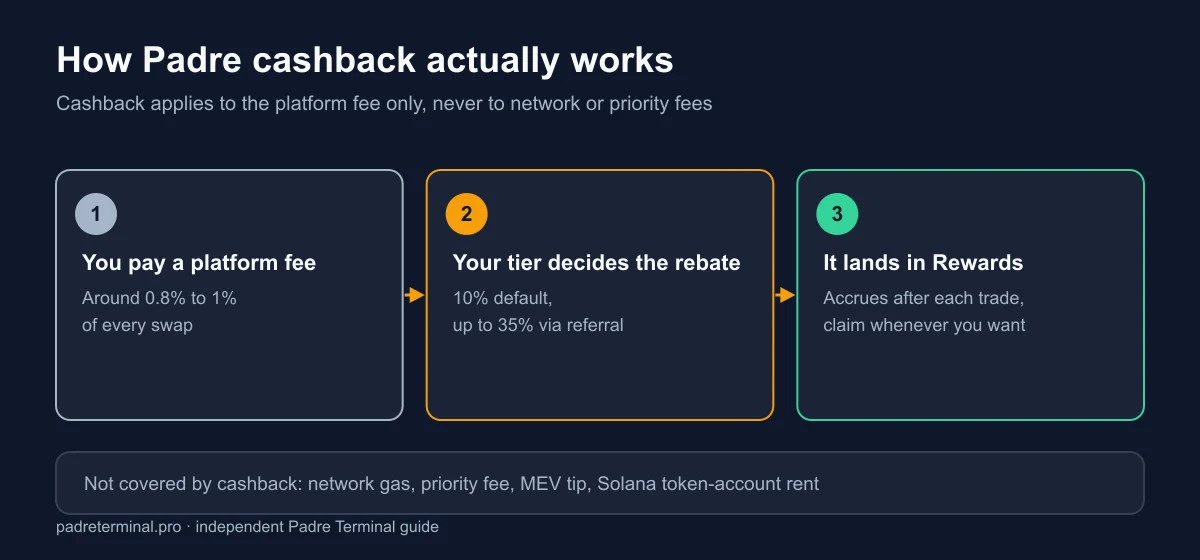
What Padre cashback is
Every swap on padre gg carries a platform fee (about 0.8% – 1%). Cashback is the portion of that fee returned to you. The default rate is 10%; when your account is linked to a referral code, the rate rises with the referrer's tier, up to 35%.
Cashback does not apply to network fees, priority fees or MEV tips, so don't expect 35% of your total costs back.
Padre gg fees: the four layers cashback can and cannot touch
This is where most of the confusion about padre gg fees starts. A single swap is not one charge, it is four, and the rebate only reaches the first one.
| Cost | Who takes it | Rebated? |
|---|---|---|
| Platform fee (0.8% – 1%) | Padre / Terminal | Yes, this is the one cashback returns |
| Network fee (gas) | The chain's validators | No |
| Priority fee | You choose it; validators keep it | No |
| Token account rent (~0.002 SOL) | The Solana network, refundable on close | No, but you get most of it back when you sell to zero |
Rent is the one people forget. On Solana, holding a new token requires opening an account for it, and that account must stay rent-exempt, which is why roughly 0.002 SOL leaves your balance per new token. How gas and priority fees are set is documented in the Solana fee reference.
How to activate it (2 minutes)
- Open Padre through a referral link. The code attaches to your sign-up session automatically; nothing to type.
- Create your account as usual (see how to trade on Padre).
- After logging in, open Rewards (or Referrals). You will see the cashback rate applied to your account.
Already have an account? Open Rewards and look for a referral-code field. If the account is already linked to another code it usually cannot be changed, so check your current rate before deciding whether to create a new account.
How Padre cashback is calculated, with an example
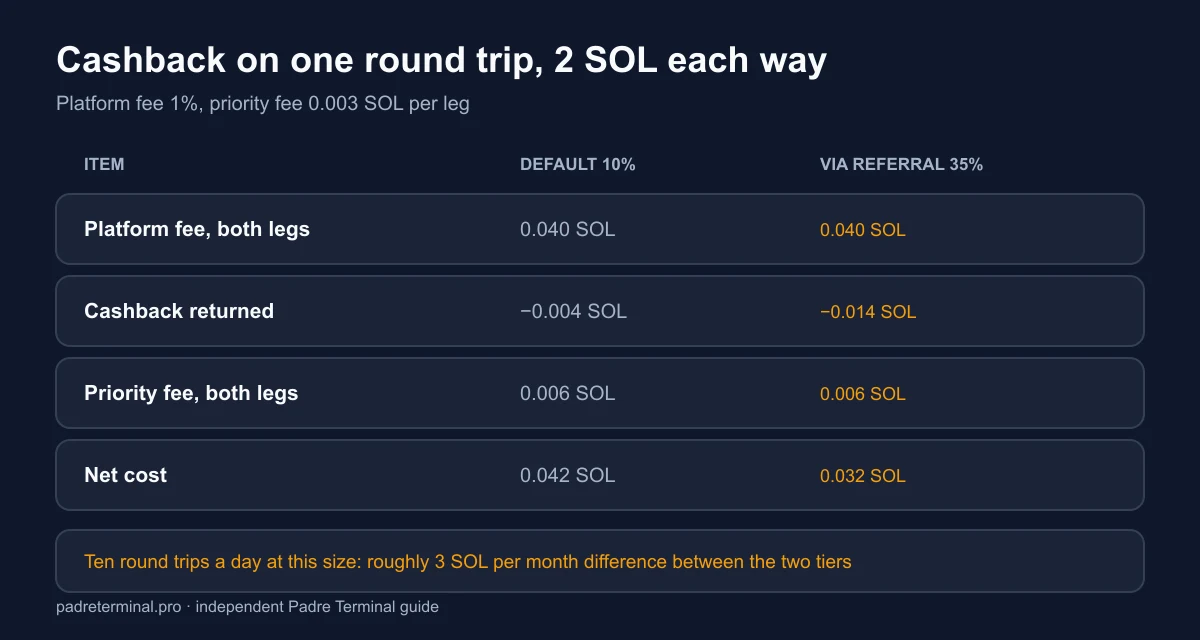
You buy 2 SOL of a token; platform fee 1% = 0.02 SOL. With 35% cashback you get 0.007 SOL back. You sell for 2 SOL, another 0.007 SOL back. One round trip: 0.04 SOL paid in fees, 0.014 SOL returned, net fee 0.026 SOL (0.65% of volume).
For someone doing 10 round trips a day at this size, the gap between 10% and 35% cashback is roughly 0.1 SOL per day, about 3 SOL a month.
When the rebate is worth caring about
Cashback scales with volume, so it is close to irrelevant for occasional traders and quietly significant for frequent ones. Rough shape, using the same 1% platform fee:
- A few trades a week at $100: the 10% to 35% gap is cents. Priority-fee discipline saves you more than the tier does.
- Several trades a day at $500: the gap reaches a few dollars a day. Worth setting up once, then forgetting.
- Scalping small positions: the tier matters least of all, because fixed costs dominate. Rent plus priority plus gas can exceed the platform fee entirely on a $20 trade, and no rebate touches those.
The honest summary: pick the better tier because it is free to do so, not because it changes whether a strategy works.
Claiming cashback
Cashback accrues in real time in Rewards. Click Claim to send it to your trading wallet on the corresponding chain. There is no meaningful minimum, but each claim is an on-chain transaction, so on EVM chains batch your claims to save gas.
Claims land in the trading wallet for that chain, not in a separate balance, so they are immediately tradeable and immediately at risk in a hot wallet. If the amount has grown, move it out the way you would move profit: see how to withdraw on padre.
4 common misconceptions about Padre cashback
- "35% cashback means the fee is only 0.65%." Only for the platform fee, before network and priority fees.
- "You need to hold a token or hit a volume target." No. Every account earns cashback; only the rate differs.
- "Using a referral link makes fees higher." No. The platform fee is identical for everyone; the referrer's commission comes out of Padre's share, not yours.
- "All referral sites are the same." The rate depends on the referrer's tier. Check the actual number in Rewards after signing up.
How to verify your own rate in two minutes
Do not take our number, or anyone's, on faith. Make one small buy, then open the transaction in an explorer and compare the SOL that actually left your wallet with the fee the confirmation panel displayed. The difference is gas, priority and rent. Then check Rewards for the rebate credited against that trade. If the two line up, your tier is what the interface claims. The current official reference for the fee model is docs.padre.gg; where our observed numbers differ from it, we say so and date the check.
Cost tips beyond cashback
- Set the priority fee just high enough; "Turbo" is only needed when the network is genuinely congested.
- Batch orders: one buy or sell of a sensible size instead of many small ones.
- Enable MEV protection selectively (thin-liquidity tokens) rather than always.
- Close dust positions to reclaim the token-account rent you paid to open them.
See the full Padre Terminal fees breakdown.
cashbackfeesPadre trade