
Padre Terminal Filters: How to Set Up Trenches Filters That Actually Find Runners
Trenches is where Padre Terminal earns its keep: new launches stream in live, and the right filter set turns that firehose into a short watchlist that pings you when something worth a look appears. Saved presets sync to your account and work on mobile. This guide covers every filter metric, the safety signals on each card, saved presets, sound alerts, and the three filter sets we use.
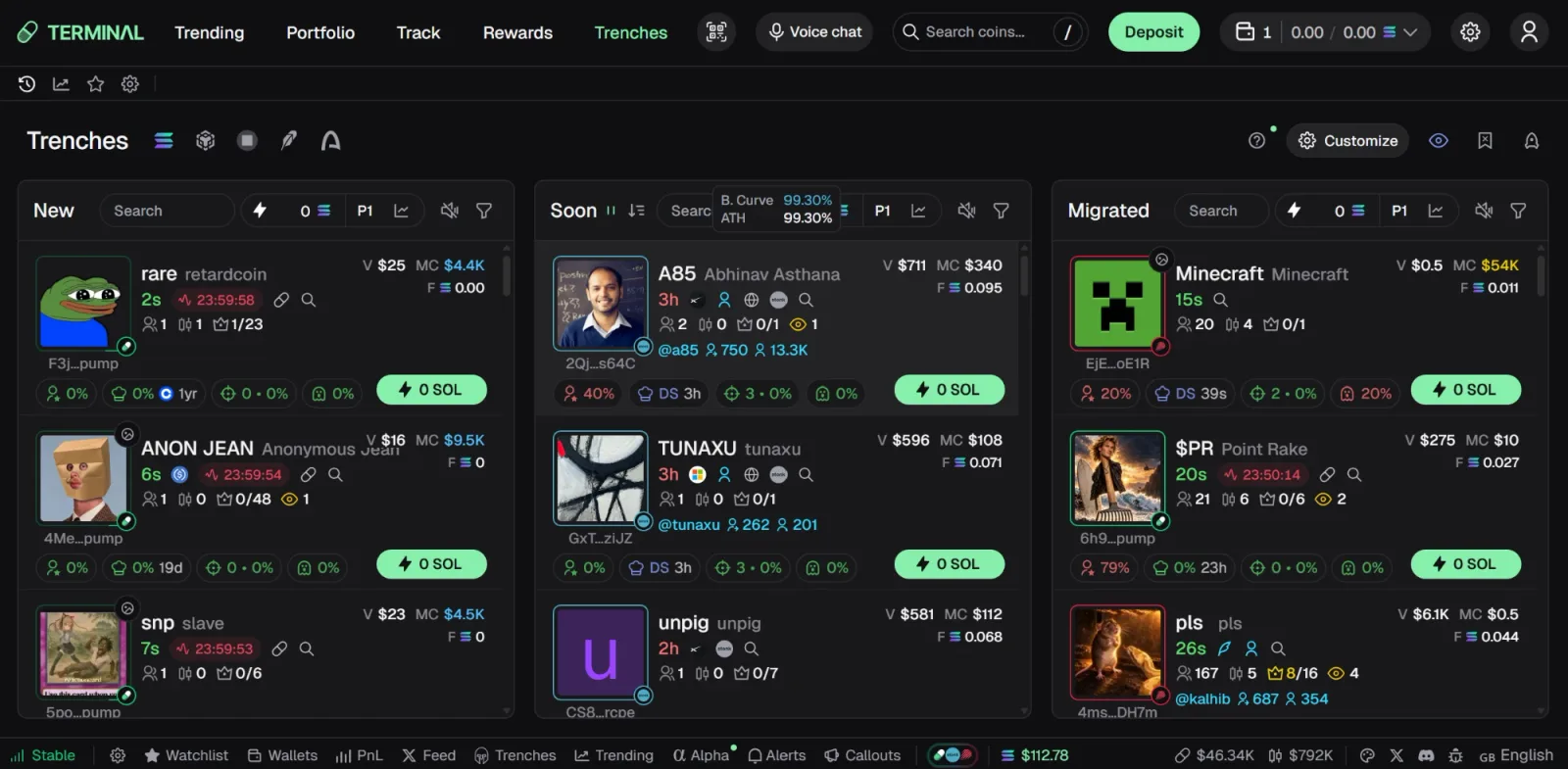
The three Trenches columns
| Column | What is in it | Survival rate |
|---|---|---|
| New | Tokens created seconds to minutes ago on Pump.fun-style bonding curves | Very low; most die within an hour |
| Soon | Tokens close to completing the bonding curve (the card shows B. Curve %, often 90–99%) | Medium; migration is a known catalyst |
| Migrated | Tokens that migrated to a real pool (Raydium/PumpSwap) | Higher; liquidity is real, rug risk shifts to dumping |
Each column has its own search box, sound toggle and filter icon in its header (and a preset selector, P1, for quick-buy size), so you can run a strict filter on New and a looser one on Migrated at the same time.
Every filter metric
Filters are min/max ranges on numeric metrics plus a few toggles. Padre currently exposes:
- Market cap (USD)
- Volume (last minutes/hour depending on column)
- Top 10 holders % of supply
- Insider holding % (wallets linked to the deployer)
- Bonding progress %
- Buys / sells (counts and ratio)
- Dev bonded (how many of this deployer's previous tokens graduated)
- Token age (minutes)
- Total holders
- Dev holding %
Toggles: Dex paid (DexScreener profile paid for), Has socials, Dev still holding. Use Reset to clear and Save to store the set under a name; saved sets live in the Saved tab and sync to your account, including the Padre Terminal app.
Safety signals on each card
Filters narrow the list; the card icons tell you whether to click. Roughly 19 metrics can be toggled on or off per card. The ones we always keep on:
- Bundle analysis (Solana): % of supply bought in the deploy bundle. Above ~20% is a red flag.
- Dev holding and insider holding percentages.
- Dev funding source and timing: a deployer funded from a fresh wallet minutes ago is a pattern of serial ruggers.
- Fresh wallet buys (Solana): many brand-new wallets buying = likely bots or a bundle.
- Bot transaction detection.
- Avatar reused: the token image was used by a previous token, usually a copycat.
- Liquidity lock icon, freeze authority warning, token tax display.
Sound alerts
Any saved filter can play a sound when a token enters its column: CORK, RING, BELL, NICE, YEAH BOY, KACHING, UGH or a custom file. Map one distinct sound per filter and keep only two or three filters armed at a time; more than that and you stop hearing them. Sounds only play while the tab or installed app is open and unmuted.
Three filter presets we actually use
1. "Early but not suicidal" (New column)
- Market cap 8K – 40K · Token age 2 – 20 min · Total holders ≥ 40
- Top 10 holders ≤ 30% · Dev holding ≤ 5% · Insider holding ≤ 10%
- Has socials: on · Dev bonded ≥ 1
- Sound: BELL. Purpose: catch launches with some organic distribution.
2. "Migration play" (Soon)
- Bonding progress 85 – 99% · Volume (5m) ≥ 5K · Buys/sells ratio ≥ 1.3
- Top 10 holders ≤ 25% · Bundle ≤ 15%
- Sound: KACHING. Purpose: enter just before graduation, sell into the migration pump.
3. "Survivors" (Migrated)
- Token age 30 – 240 min · Market cap 60K – 500K · Total holders ≥ 300
- Dev still holding: off (dev has sold) or Dev holding ≤ 3%
- Dex paid: on · Has socials: on
- Sound: NICE. Purpose: tokens that survived the first dump and are building a base.
Numbers are starting points for a market like September 2026; tighten them when the New column is flooded and loosen them in quiet periods. Filters do not replace the memecoin safety checklist you run before clicking Buy.
Common filter mistakes
- Only filtering by market cap. A 20K market cap with 8 holders is a bundle, not a community.
- Ignoring token age. Under 2 minutes you are competing with snipers; over 60 minutes in New usually means it already failed.
- Too many armed alerts. Alert fatigue leads to clicking without reading the card.
- Copying someone's preset blindly. Presets encode a thesis and a risk tolerance; adjust size to yours.
Next: how to use Padre Terminal for presets, slippage and MEV settings, and the Padre fee breakdown to understand what each quick buy costs.
Set up your first filter in Trenches
Open Padre Terminal, click the filter icon in the New column and save the "Early but not suicidal" preset. Cashback up to 35% via our link.
tradepadre35
New account: the link applies it automatically. Existing account: Rewards → paste the code.