
How to Trade on Padre Terminal: Step-by-Step for Beginners
You can be placing your first trade on Padre Terminal in about fifteen minutes, with a wallet only you control and up to 35% of the platform fee coming back on every order. These are the 8 steps we use to onboard friends: creating a wallet, setting the encryption password, depositing, placing limit orders and stop losses, copy trading, and withdrawing to cold storage. About 15 minutes end to end.
What you need: Chrome, Safari or Brave; a Google, X or Telegram account to sign in with; a password manager; some SOL (or ETH/BNB) in an existing wallet or exchange to deposit; and pen and paper for your seed phrase.
-
Open trade.padre.gg and sign up
Type
trade.padre.ggby hand or use our referral link (higher cashback). Sign in with Google, X or Telegram (there is no email-and-password form). Always use the same provider afterwards; each one creates a separate account. Details are on the Padre Terminal login page.- Check the HTTPS padlock and the exact domain spelling before typing anything.
- If you arrive via a referral link the code is attached automatically; nothing to enter manually.
-
Create your trading wallet and back up the seed phrase
After login, Padre creates a wallet for each chain (Solana, Ethereum, Base, BNB). Go to Wallets, choose Export / Backup, write the seed phrase or private key on paper and store it safely.
- No screenshots, no phone notes, no cloud storage.
- You can import an existing wallet, but we recommend a fresh wallet used only for trading.
- Losing the seed phrase means losing the funds; Padre cannot recover it.
-
Set the wallet encryption password (Padre's "2FA" layer)
Padre asks you to set a separate password that encrypts your private keys on your device. Padre markets this as its 2FA layer; it is not an authenticator-app code. Store it in a password manager.
- It cannot be reset. If you forget it, only an exported private key (step 2) gets your funds back.
- It is required for key export and withdrawals, so choose something long and unique.
-
Deposit funds
Select the chain you want to trade (e.g. Solana) and click Deposit to get your address. Send SOL from Phantom, Binance, Coinbase or any wallet. Send 0.05–0.1 SOL first, confirm it arrives, then send the rest.
- Keep at least ~0.02 SOL in the wallet for network fees and rent.
- Each chain has a different address; never send ETH to a Solana address.
-
Find a token and check it before buying
Paste the contract address into search or browse Trending / Trenches. On the token page read Smart Scan (honeypot, dev holding, LP), Top holders and liquidity. Sixty seconds here saves a lot of money later.
- Run the nine-point checklist on every token before you buy.
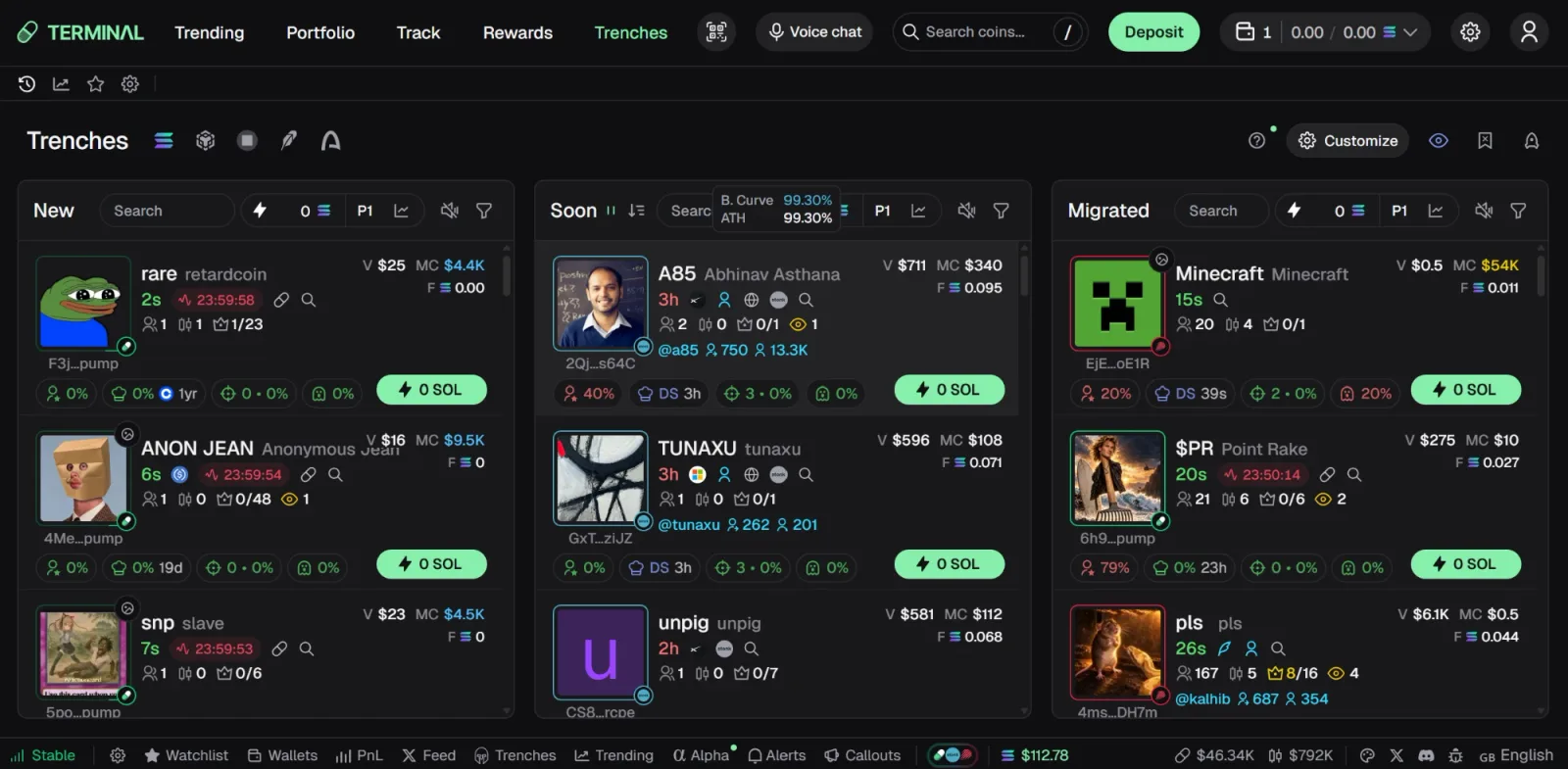
Trenches in Padre Terminal, screenshot from our own account (September 2026): New, Soon and Migrated columns, per-card safety badges and quick-buy presets. -
Place a buy order
In the Buy panel choose a preset (0.1 / 0.5 / 1 SOL…) or type an amount. Open the order Settings to adjust slippage (10–20% for brand-new tokens, 1–5% for established ones) and priority fee (raise it when the network is congested). Click Buy; fills typically take under a second.
- High slippage gets you filled but you may pay more than the displayed price.
- Turn on MEV protection for low-liquidity tokens to avoid sandwich attacks.
-
Manage the position: take profit, stop loss, sell
Right after buying, open the Orders tab or drag on the chart to set a Take Profit (e.g. sell 50% at +100%) and a Stop Loss (e.g. -30%). Sell manually with the Sell 25% / 50% / 100% buttons.
- On thin tokens a stop loss can fill below your level.
- To copy trade: go to Track, add a wallet address, enable Copy, set a fixed SOL amount per order and a total cap.
-
Claim cashback and withdraw
Cashback accrues in Rewards after every trade; click Claim to move it to your Padre wallet. To cash out, open Withdraw, paste your cold-wallet or exchange address and confirm with your encryption password. Test with a small amount for any new address. Full details in how to withdraw from Padre.
Common problems and fixes
| Symptom | Usual cause | Fix |
|---|---|---|
| Orders keep failing | Slippage or priority fee too low during congestion | Raise slippage to 15–25% for new tokens; bump priority fee one level |
| Bought but cannot sell | Honeypot or liquidity pulled | Check Smart Scan before buying; there is no fix after the fact |
| Deposit not showing | Wrong chain or transaction not yet confirmed | Check the tx hash on Solscan/Etherscan; verify address and chain |
| Stop loss filled below the level | Fast drop, thin liquidity | Accept slippage, or set stops earlier and split positions |
| Forgot the encryption password | No reset exists | Import your exported private key into Phantom/MetaMask; see how to withdraw from terminal padre |
5 tips from real trading
- Split capital across several small wallets. Padre supports multi-wallet; don't keep everything in one hot wallet.
- Set TP/SL before you leave the screen. Memecoins can drop 80% in five minutes.
- Prefer tokens with locked or burned LP and dev holdings under 5–10%.
- Track 3–5 good wallets instead of blindly copy trading; understand why they buy.
- Withdraw profits to cold storage weekly. Unrealized profit is not profit.
Read next
- Padre Terminal fees and how to maximise cashback
- Padre Terminal security: how to avoid phishing clones
- Padre Terminal filters that find runners
- Common Padre Terminal questions
- Never traded on-chain before? Padre crypto trading for beginners
- Coming from a bot? Padre vs Telegram bots
Start with step 1 right now
Open trade.padre.gg through our referral link to get up to 35% cashback automatically. Remember to test with a small deposit first.
tradepadre35
New account: the link applies it automatically. Existing account: Rewards → paste the code.