Padre Wallets Explained: Multi-Chain, Non-Custodial, Your Keys
How Padre wallets work across Solana, Ethereum, Base and BNB Chain: browser encryption, private key export, gas per chain, and the backup that saves you.
One Padre login, four chains, and a separate wallet on each of them. That design keeps trading simple and backups complicated, and most of the support questions we see come from people who did not realise the second part. This is how Padre wallets work and what you have to store offline.
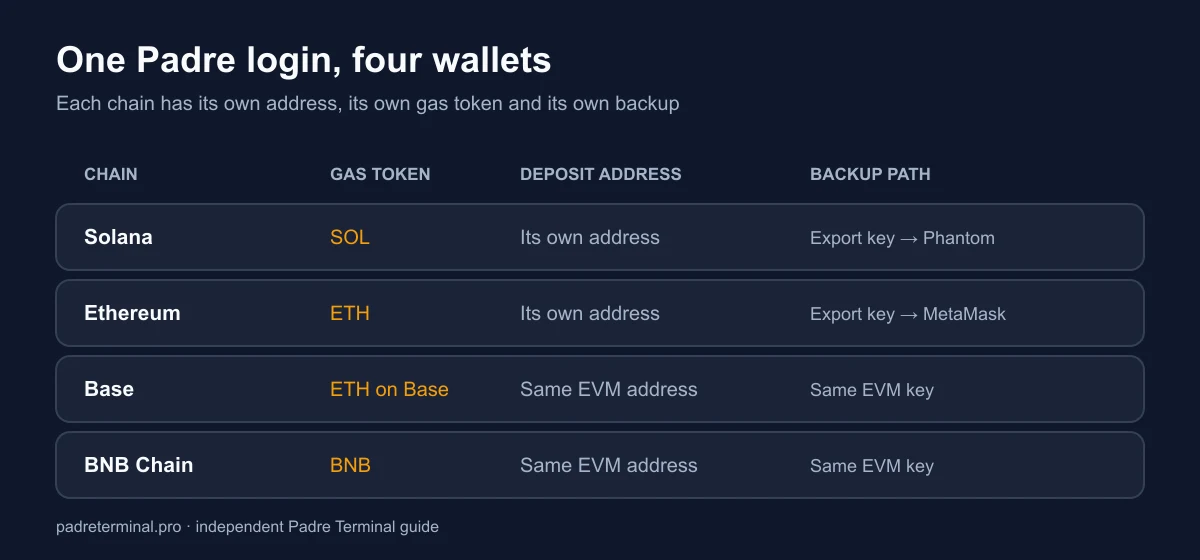
One account, one wallet per chain
When you sign in with Google, X or Telegram, Padre generates a wallet for each supported chain: Solana, Ethereum, Base and BNB Chain. They are ordinary wallets, not an internal ledger. Everything they do is visible on Solscan, Etherscan, BaseScan or BscScan under their own addresses.
Three consequences follow, and all three cost people money:
- Addresses differ per chain. The Solana address is not the EVM address. Sending SOL to your Base address, or ETH to your Solana address, is usually unrecoverable.
- Gas is per chain. SOL for Solana, ETH for Ethereum and Base, BNB for BNB Chain. Without the gas token you cannot trade and cannot withdraw, even when the wallet holds USDC.
- Backups are per wallet. Exporting one key does not back up the others.
The encryption password is the whole security model
Your private keys are generated and encrypted in your browser with a password you set once. Padre stores the encrypted blob, never the password, and there is no reset. Forgetting it means the keys stay encrypted forever unless you exported them earlier. Padre markets this layer as its 2FA; it is not an authenticator code, so the real second factor is the security of the Google, X or Telegram account you sign in with. More on that on the login page.
The backup routine that takes five minutes
- Open Wallets and select the chain.
- Choose Export and reveal the private key or seed phrase. The encryption password is required.
- Write it on paper. Two copies, two locations. No screenshots, no notes app, no cloud drive, no password-manager note that syncs to a phone you also trade on.
- Repeat for every chain you actually fund. Skipping a chain is fine as long as you never deposit to it.
- Store the encryption password separately from the keys, so one compromised place is not enough.
Do this the day you create the account, not the day you have a position worth protecting.
Multi-wallet, and why we use it
Padre supports several wallets per chain. Two habits make that worth the extra management:
- Split by purpose. One wallet for fresh launches you expect to lose money on, one for positions you intend to hold hours or days. A drained hot wallet then costs you one bucket, not everything.
- Split by size. Keep the balance in each trading wallet at what you are willing to write off, and move profit out weekly.
Archived wallets still count toward the account limit, so retire them deliberately rather than creating one per week.
Importing an existing wallet
You can import a wallet you already own. We recommend against importing anything that holds long-term funds: once a key has been pasted into a browser-based terminal it is a hot key, and it should be treated as one from that moment. If you do import, move the long-term balance to a hardware wallet first.
Saved withdrawal wallets
Under Wallets → Withdrawal Wallets you can register a named destination per chain, for example a Ledger address. Afterwards you pick it from a list instead of pasting an address, which removes the clipboard-swap attack where malware replaces a copied address. Set one per chain and point it at cold storage. The full withdrawal flow, including the 0.01 SOL minimum and the gas requirement, is in how to withdraw from Padre.
Wallet hygiene checklist
- Export every funded wallet's key to paper on day one.
- Keep roughly 0.05 SOL, or the chain's equivalent, as a permanent gas buffer.
- Register cold-storage withdrawal wallets before you need them.
- Test every new destination address with a small amount.
- Never paste a key into a website, a Telegram bot or a "recovery tool". Padre never asks for it, and neither do we.
If a wallet is behaving oddly rather than just empty, start with the security review to rule out a phishing clone before anything else.
walletssecuritymulti-chain