Padre Withdrawal Not Working? Six Causes and the Fix
Why a Padre withdrawal gets stuck: no gas token, under the 0.01 SOL minimum, congestion, frozen tokens, the wrong chain, plus the private key fallback.
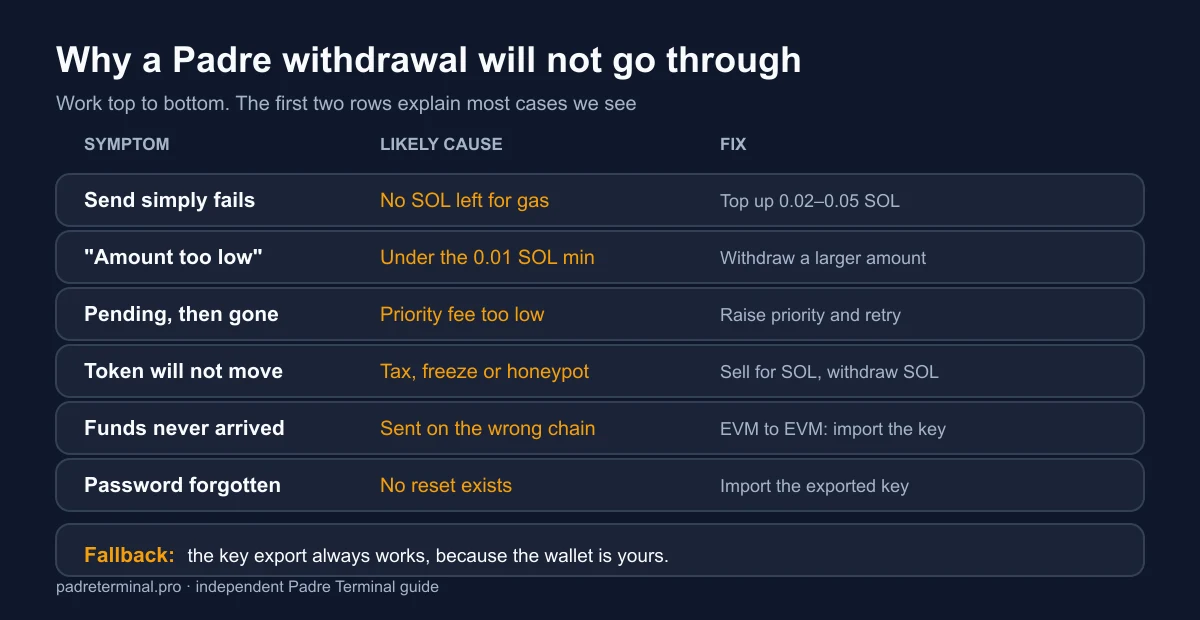
"My withdrawal is stuck" is the most common Padre complaint we see, and in nearly every case the funds are not stuck at all: the wallet simply cannot pay for the transaction that would move them. This is the diagnostic order we work through, from the cheap checks to the fallback that always works.
1. You have no gas, even though the balance looks fine
This causes more stuck withdrawals than everything else combined. Moving anything on a chain costs the chain's native token: SOL on Solana, ETH on Ethereum and Base, BNB on BNB Chain. A wallet holding $400 of USDC and zero SOL cannot send that USDC anywhere. The balance is real, spendable and completely inert.
Fix: send 0.02 to 0.05 SOL to the same Padre address, wait for confirmation, retry. Then keep roughly 0.05 SOL parked permanently so it never happens again.
2. The amount is under the minimum
Padre enforces a minimum of 0.01 SOL per withdrawal. Withdrawing a balance that leaves less than the network fee behind also fails. If you are trying to empty a wallet exactly to zero, leave a little behind or top it up first.
3. The network is congested
During heavy Solana traffic a transaction sent with a low priority fee can sit unconfirmed and eventually drop. It looks like a hang; it is a queue. Raise the priority setting one level and retry. The transaction hash tells you the truth: paste the address into Solscan and look for a dropped or failed entry rather than a pending one.
4. The token itself will not move
If the stuck balance is a memecoin rather than SOL or USDC, the token may carry a transfer tax, a freeze authority or an outright honeypot design. No terminal can withdraw a token whose contract refuses transfers.
Fix, when one exists: sell the token inside Padre for SOL and withdraw the SOL. If the sell also fails, the position is gone; that is what a honeypot is. Avoiding this class entirely is what the nine-point checklist is for.
5. You sent to the wrong chain
Padre gives you a separate wallet per chain, so a Base address and a Solana address are different strings entirely. Funds sent to an address on the wrong network are usually unrecoverable, with one exception: EVM-to-EVM mistakes (for example ETH mainnet to a Base address) are sometimes recoverable because the same private key controls both addresses. Import the key into MetaMask or Rabby, switch networks, and the balance may be visible there. How the wallets are laid out is explained in Padre wallets explained.
6. You forgot the encryption password
There is no reset. If you exported the private key when you created the wallet, import it into Phantom (Solana) or MetaMask/Rabby (EVM) and move the funds from there. If you never exported it, the keys stay encrypted and the balance is unreachable. This is the single strongest argument for doing the export on day one.
The fallback that always works
Because Padre is non-custodial, your Padre wallet is an ordinary wallet. Whenever the in-app flow misbehaves for a reason you cannot diagnose:
- Wallets → select the wallet → Export private key.
- Import that key into Phantom, MetaMask or Rabby.
- Send the funds from there, remembering that gas still applies.
- Treat that Padre wallet as retired afterwards, since the key has now been handled in a second app, and move to a fresh one.
Never paste a private key into a website, a Telegram bot or anything advertising itself as a recovery service. Those are the two most common ways people turn a stuck withdrawal into a permanent loss.
Habits that prevent all of this
- Keep a permanent gas buffer of about 0.05 SOL, and its equivalent on any EVM chain you use.
- Register saved withdrawal wallets pointing at cold storage, so you select rather than paste.
- Test every new destination address with a small amount first.
- Withdraw realised profit weekly instead of letting it accumulate in a hot wallet.
- Export every funded wallet's key to paper the day you create it.
The straightforward path, when nothing is broken, is in how to withdraw from Padre. If a page asked for your seed phrase during any of this, stop and read the security review first.
withdrawalgashow to withdraw from padre gg